


باستخدام ميزة تحسين تخصيص الأصول، يمكنك إعادة توازن وتحسين هيكل محفظتك بسرعة.
كيفية الوصول
يمكنك الوصول إلى تحسين تخصيص الأصول عبر التطبيق - [الأصول] - [نظرة عامة]. سوف يظهر لافتة للدخول إلى تحسين تخصيص الأصول. إذا لم تكن هناك أصول مؤهلة للتحسين، فلن يتم عرض نقطة الدخول.

كيفية الاستخدام
الخطوة 1: اختر الأصول لتحسينها. اختر الأصول التي تريد تحسينها. يمكن اختيار عملات مشفرة متعددة في نفس الوقت. يعتمد عدد الأصول المتاحة للتحسين على الرصيد المتاح في حسابك الفوري / الحساب الموحد. لاحظ أن بعض الأصول قد تكون غير متاحة مؤقتاً للتحسين بسبب قيود عمق السوق.
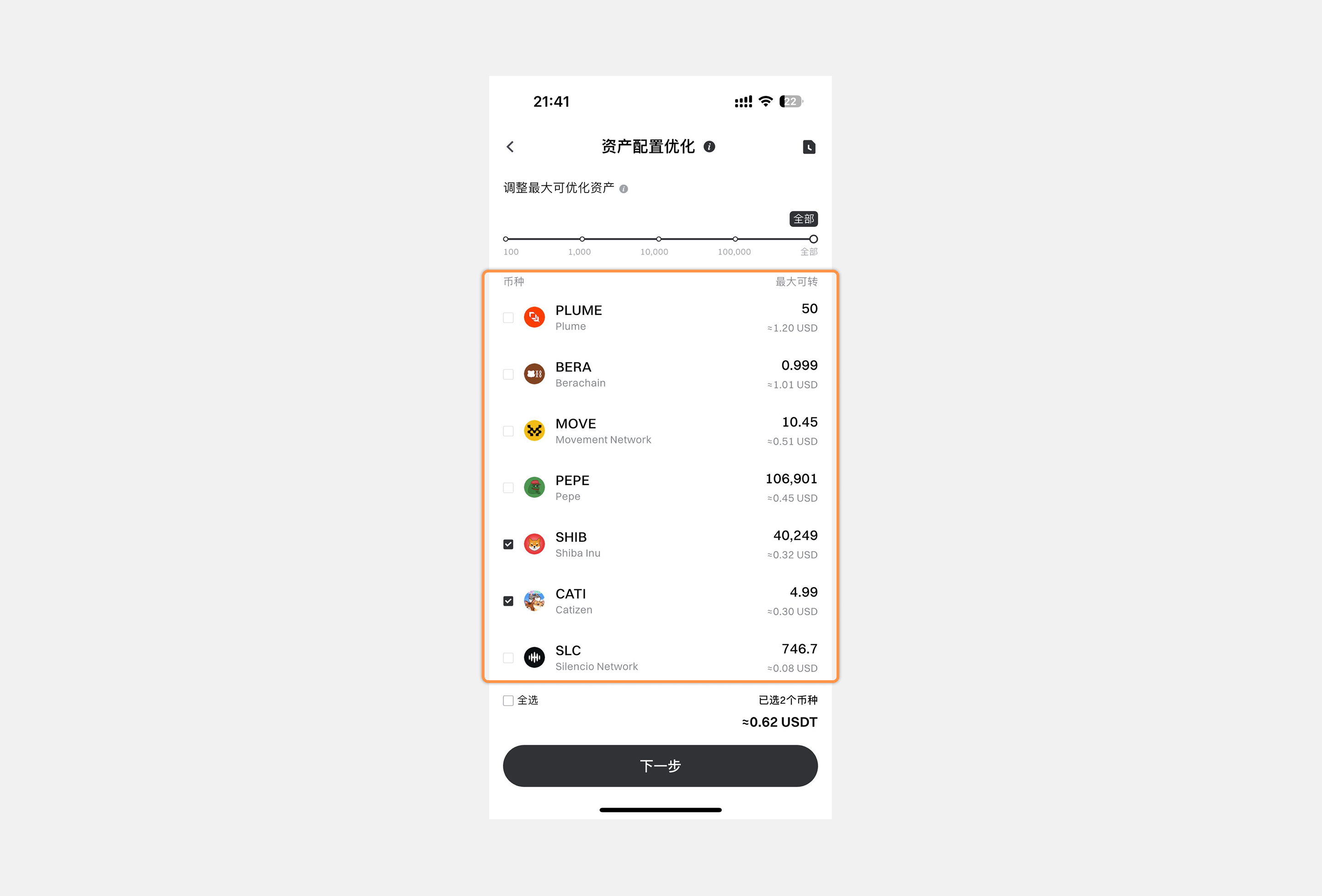
الخطوة 2: اختر استراتيجية التخصيص.
تشمل الاستراتيجيات الموصى بها الاستراتيجية المتحفظة، واستراتيجية القناعة، واستراتيجية القيمة السوقية. يمكنك أيضاً إنشاء خطة تخصيص مخصصة بناءً على تفضيلاتك.

الخطوة 3: تأكيد وتنفيذ التحسين. بعد التأكيد، سيقوم النظام بالمضي قدماً في تحسين الأصول. يمكنك عرض نتائج التحسين في سجل التحسين.
المحتوى الوارد هنا مُقدَّم لأغراض مرجعية وتعليمية فقط، ولا يشكّل أي نصيحة مالية أو استثمارية أو تداولية أو قانونية، كما لا يُعد عرضًا أو دعوة لشراء أو بيع أي أصول رقمية. لا تقدّم Gate أي تعهدات أو ضمانات صريحة أو ضمنية بشأن دقة المعلومات الواردة هنا أو اكتمالها أو توقيتها. قد يتم تحديث أو تعديل ميزات المنتجات والواجهات والقواعد وهياكل الرسوم في أي وقت. يرجى الرجوع إلى أحدث الإعلانات والمعلومات الفعلية المعروضة على منصة Gate للحصول على أدق التفاصيل.
تنطوي الاستثمارات في الأصول الرقمية على مخاطر كبيرة، وقد تتقلب الأسعار بشكل ملحوظ. وقد تفقد كامل مبلغ استثمارك. يرجى اتخاذ قراراتك بحذر بناءً على وضعك المالي وقدرتك على تحمّل المخاطر بعد الفهم الكامل للمخاطر المرتبطة بذلك. وإذا لزم الأمر، يُنصح باستشارة مستشار مالي أو قانوني مستقل.
لمزيد من المعلومات حول المخاطر المحتملة، يرجى الرجوع إلى إفصاح المخاطر واتفاقية المستخدم الخاصة بـGate.
